Price:
Any price and availability information displayed on [relevant Amazon Site(s), as applicable] at the time of purchase will apply to the purchase of this product.”>

WiFi Connection Tutorial (only supports connecting to 2.4Ghz WIFI)
1. Scan the QR code on the instruction manual or search in the App Store, download and install the “XiaoMei Smart” APP.
2. Open the APP, register an account with your email address in the APP, and allow the APP to obtain the corresponding permissions.
3. Turn on the WiFi and Bluetooth of the phone and let the phone connect to 2.4GHz WiFi.
4. Press and hold the fish feeder button for 6-8 seconds, and the blue indicator light flashes quickly to enter the network pairing mode. Click “Add Smart Device”. Refresh page, the APP will automatically search for the fish feeder, click on the model WP8615S.
5. Enter the WiFi password, click next step, connection successful.
Note
A. The fish feeder can only connect to 2.4GHz WiFi. Cannot connect to 5GHz WiFi alone. If your router is dual-band 2-in-1, the fish feeder will automatically select 2.4GHz to connect. When connecting for the first time, stay as close to the router as possible.
B. But this is not absolute. If your connection fails in dual-band 2-in-1 mode, Please try setting the router to 2.4GHz mode to connect. Another possible reason for connection failure, check whether too many devices have been added to the router. If the number of devices added by the router exceeds the upper limit, the router will be unable to add new devices.
Product Dimensions : 2.95 x 4.33 x 2.95 inches; 8.47 ounces
Item model number : WP8615S
Date First Available : June 11, 2025
Manufacturer : VSON TECHNOLOGY CO.,LTD
ASIN : B0FCCNFD1Y
Best Sellers Rank: #54,389 in Pet Supplies (See Top 100 in Pet Supplies) #74 in Automatic Fish Feeders
Customer Reviews: 3.3 3.3 out of 5 stars (14) var dpAcrHasRegisteredArcLinkClickAction; P.when(‘A’, ‘ready’).execute(function(A) { if (dpAcrHasRegisteredArcLinkClickAction !== true) { dpAcrHasRegisteredArcLinkClickAction = true; A.declarative( ‘acrLink-click-metrics’, ‘click’, { “allowLinkDefault”: true }, function (event) { if (window.ue) { ue.count(“acrLinkClickCount”, (ue.count(“acrLinkClickCount”) || 0) + 1); } } ); } }); P.when(‘A’, ‘cf’).execute(function(A) { A.declarative(‘acrStarsLink-click-metrics’, ‘click’, { “allowLinkDefault” : true }, function(event){ if(window.ue) { ue.count(“acrStarsLinkWithPopoverClickCount”, (ue.count(“acrStarsLinkWithPopoverClickCount”) || 0) + 1); } }); });
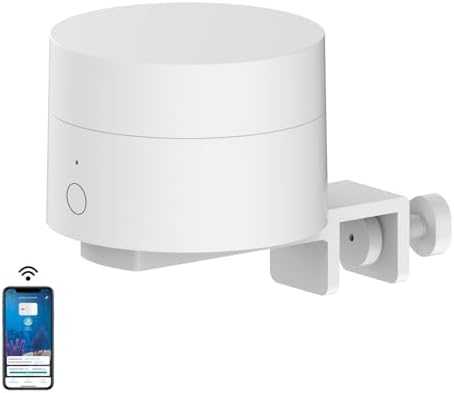
【Innovative Design】 The mini fish feeder has a horizontal rotating feeding design. When not feeding, the fish feeder is in a relatively closed state, effectively isolating water vapor and solving the problem of fish food getting damp. Feed accurately in small amounts, with the WIFI smart APP, you can easily set the feeding plan, and the APP can be remotely controlled.
【WiFi Fish Feeder Power Supply】 The smart mini fish feeder is directly powered by 5V USB. The package includes an adapter and a Type-C cable. Please make sure there is a power socket near the fish tank. When the power is turned on after a power outage, the fish feeder will automatically connect to the network and resume work.
【Easy to Install】 With adjustable clamps, you can easily tighten the screws to fix the feeder on the aquarium, easy to assemble and disassemble.
【View Feeding History】 On the APP, you can view the feeding records of the fish feeder for the past year. Lack of fish feed records. Aquarium water change/cleaning records. Specific to the year, month, day, time, feeding times. If you have any questions during the use of the product, please feel free to contact us through the after-sales email.